 AI
AI
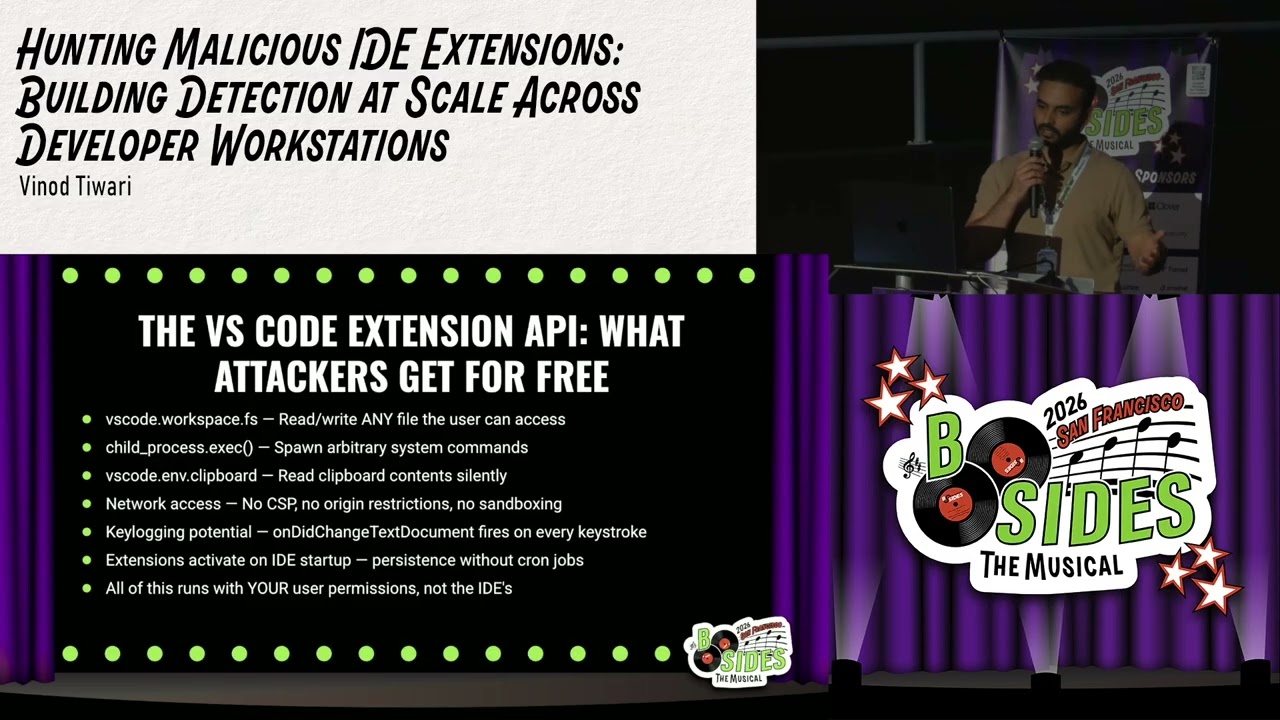
The Blind Spot: IDE Extensions with Full System Access
VS Code and JetBrains extensions run inside the IDE with full file system and child process access. No permission prompt appears during installation. The VS Code documentation confirms extensions have “full access to your system.” A VS Code package is a Node.js application with a manifest listing permissions, and it runs in a Node.js runtime with no sandbox. JetBrains extensions run in a JVM with JNI access. Malicious extensions can spawn curl, read .env files, access clipboard, and exfiltrate SSH keys. One known extension stole SSH keys for two years before detection.
Why Web3 Developers Are a Prime Target
Web3 developers deploy smart contracts from their machines. Private keys for wallets that hold millions of dollars are often stored in environment variables. Default tools like Hardhat and Foundry pick keys from plain-text .env files. Later features allow storing keys in the macOS keychain, but many developers still rely on environment variables. A malicious extension with workspace.fs or child_process permission can read those keys and drain wallets. The Prettier VS Code Plus extension downloaded a Trojan targeting crypto devs. Another extension used invisible Unicode characters to siphon wallet keys.
Building Detection with MDM and a Bash Script
Tiwari had only Jamf MDM and no specialized tool. He wrote a bash script that enumerated all IDEs (VS Code, JetBrains, Cursor) and their installed extensions on each developer machine. The script saved a cache file locally. A second Jamf policy read the cache, compared extensions against an allow-list created with developer input, and sent a Slack alert for any unapproved extension. At Story Protocol, 32 developers on 30 active hosts had over 1,000 total extension installs and 556 unique extensions. One developer had 157 extensions.
Limitations of EDRs and the Case for Specialized Scanning
EDRs like CrowdStrike see the IDE as an Electron app with child Node.js processes. They build process trees and look for known IOCs and IOAs. But if an extension is not yet recognized as malicious, the EDR provides no alert. Extensions can operate undetected for years. Tiwari built a custom scanner called ID Viewer that analyzes the permissions requested by each extension, scores the risk, and outputs JSON for ingestion. He plans to open-source it on GitHub.
Triage Playbook and the Allow-List Approach
When a suspicious extension appears, Tiwari checks community support, open-source code on GitHub, active issue fixing, and pull request review. A theme extension should not request permission to read SSH keys. He uses the allow-list as the trusted baseline and disables auto-update on unapproved extensions. The same approach works with any MDM tool. He also manually removes extensions from the .vscode/extensions directory via MDM after notifying developers.
Q&A
How do you distinguish an overly permissive extension from a malicious one? Permission analysis, community support, open-source code review, and whether the extension needs the permissions it requests. ▶ 24:25
In CrowdStrike’s vulnerability tab showing IDs, how do you prioritize? Same playbook: focus on permissions and use case. Run static analysis on extensions even if community-trusted. ▶ 25:55
Aren’t vendors like Socket already detecting this? Socket focuses on package supply chain analysis, not IDE extensions specifically. There is a gap for extension analysis. ▶ 26:47
What is the name of the repo you plan to post? ID Viewer. It will be posted on GitHub and shared via LinkedIn. ▶ 27:37
Do you maintain a top 100 or 200 approval list per IDE? Yes, for their environment (mostly Cursor based on Open VSX). They cleaned up many extensions after inventory. ▶ 28:02
Notable Quotes
“these extensions sometimes say they don’t disclose like you know what permissions they acquire, but you would have to like analyze their their manifest file to find out” Vinod Tiwari · ▶ 07:03
“I could not believe that like, you know, why would you need like more than hundreds of extensions on your machine?” Vinod Tiwari · ▶ 15:57
“if if there is no like, you know, known extension that that is doing malicious activities, probably your your EDRs won’t be helpful as well” Vinod Tiwari · ▶ 17:57
Key Takeaways
- IDE extensions run with full user-level access and no permission prompts.
- Attackers target web3 developers by stealing wallet keys via extensions.
- An MDM bash script can inventory extensions and alert on unapproved ones.
- Custom scanners like ID Viewer analyze extension permissions for risk scoring.
- Disable auto-update on extensions to prevent silent malware injection.
About the Speaker(s)
Vinod Tiwari has spent the past decade working in cybersecurity across financial services, government, and tech sectors. Currently a Staff Security Engineer at PIP Labs, he navigates the intersection of traditional enterprise security and the emerging world of Web3 and blockchain infrastructure.