 AI
AI
How Windows Hello for Business Chains Biometrics to Domain Keys
Windows Hello for Business enrollment generates an asymmetric key pair. The public key registers with Active Directory or Entra ID. The private key stays on the machine, inside the TPM when available. Each biometric gesture (face, fingerprint, TPM PIN) unlocks a gesture-specific protector key. That protector key decrypts a shared authentication key. The authentication key activates the TPM-bound private key, which signs a Kerberos challenge against the identity provider. Biometrics never leave the machine. They only gate access to that key chain.
The Windows Biometric Service Internals and ESS Mode
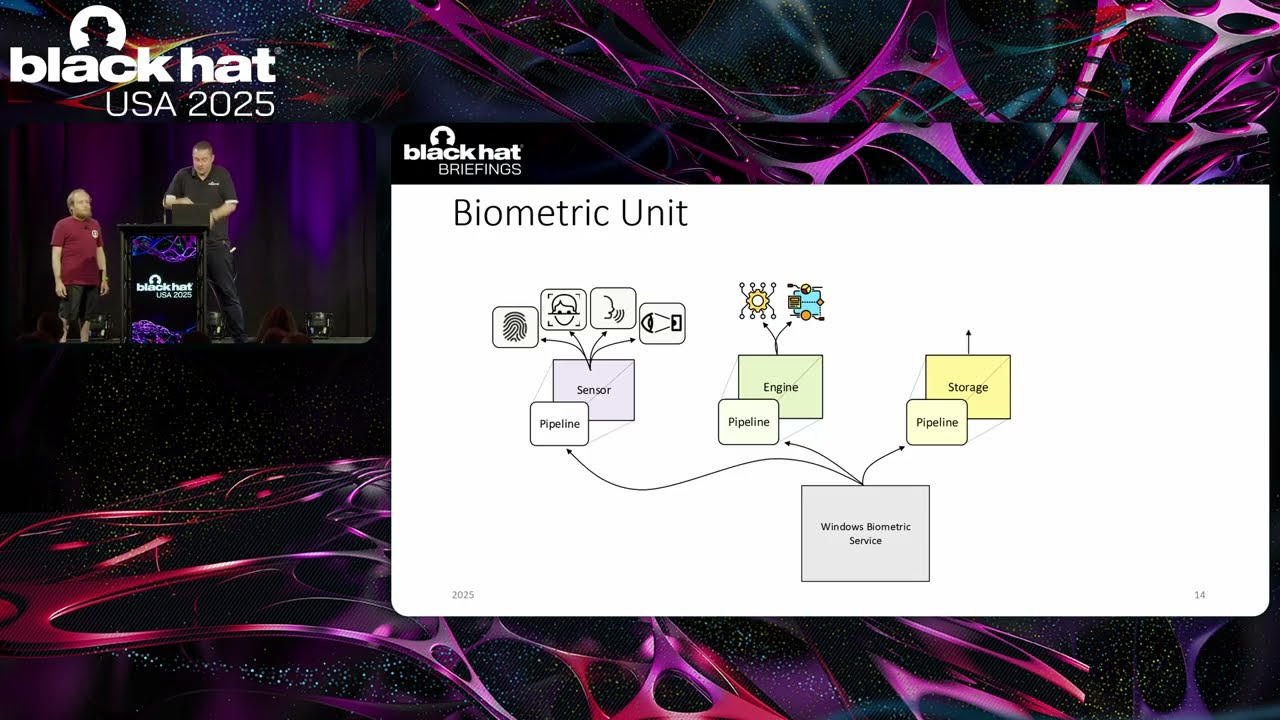
The Windows Biometric Service runs as SYSTEM in session zero. It loads three adapter DLLs per biometric unit: sensor (capture), engine (AI-threshold matching), and storage (template database). A fourth undocumented adapter, the framework adapter, bridges communication with the VBS-isolated environment.
Enhanced Sign-in Security (ESS) mode routes biometric data through the hypervisor to a VTL1-isolated service, shielding templates from VTL0 kernel access. It requires a hardware-certified secure sensor. The ThinkPads used in this research run AMD chips and lack that certification, so ESS mode was unavailable and all template operations happened in unprotected VTL0.
Why Biometric Authentication Has No Entropy
Password authentication hashes the password and uses that hash as entropy in a Kerberos exchange. The password is the secret. With biometrics, the face produces only an identification ticket. The actual signing key is released separately, loaded from data already on disk after identification succeeds.
That key release calls CryptProtectData and CryptUnprotectData. In an interactive user session, those functions are bound to the user’s password. The biometric service runs as SYSTEM, where all required data is already present. No user secret is involved. The biometric check and key release share no cryptographic coupling.
Database Encryption Broken by Local Admin Privileges
The biometric database header stores an AES-CBC key and a SHA-256 integrity hash, all encrypted. The protection mechanism is CryptProtectData scoped to SYSTEM. Any local administrator can call CryptUnprotectData with no additional secret, read the per-database key, decrypt every enrolled user’s face template, swap SIDs, and rewrite the hash.
The researchers demonstrated this with a live biometric injection demo (29:17): they replaced Baptiste’s template with their own face, re-encrypted the record, and Windows Hello accepted the attacker’s face as Baptiste, granting domain access. Local admin became domain user.
Notable Quotes
Yeah, your face. But not only your face. Till · ▶ 30:34
So, that’s me. I’m Baptist. Now Till · ▶ 32:04
example to local admin to domain admin. Till · ▶ 33:11
Key Takeaways
- Local administrators can decrypt the biometric template database and inject their own face to authenticate as any enrolled domain user.
- Biometric authentication provides no entropy; the key release depends entirely on data already present on the local machine.
- ESS mode with a hardware-capable secure sensor isolates templates in VTL1, making the attack significantly harder.